
Best PayBot Alternative for Discord Monetization: Subscord
Looking for a PayBot alternative with crypto payments and no percentage-based platform fee? Compare PayBot and Subscord for payments, pricing, Discord roles, storefronts, and subscriptions.

PayBot solves a real problem: it connects Stripe payments to Discord access so community owners do not have to assign and remove roles by hand.
But PayBot is not the right fit for every paid Discord server.
If you want to accept cryptocurrency, avoid a percentage fee that grows with revenue, or give buyers both card and crypto checkout options, Subscord is a strong PayBot alternative.
This comparison explains where each platform is strongest, how their pricing models differ, and which one better fits your community.
What is PayBot?
PayBot is a Stripe-focused Discord payment bot. A guild connects its own Stripe account, creates subscriptions or one-time products, and links those offers to Discord roles.
When a buyer pays, PayBot grants access automatically. It also promotes features such as:
- Branded storefront and payment pages
- Subscription and one-time payment links
- Automated Discord role assignment
- Member self-service inside Discord
- Courses and community engagement tools
- Analytics and integrations with tools such as Zapier and Make
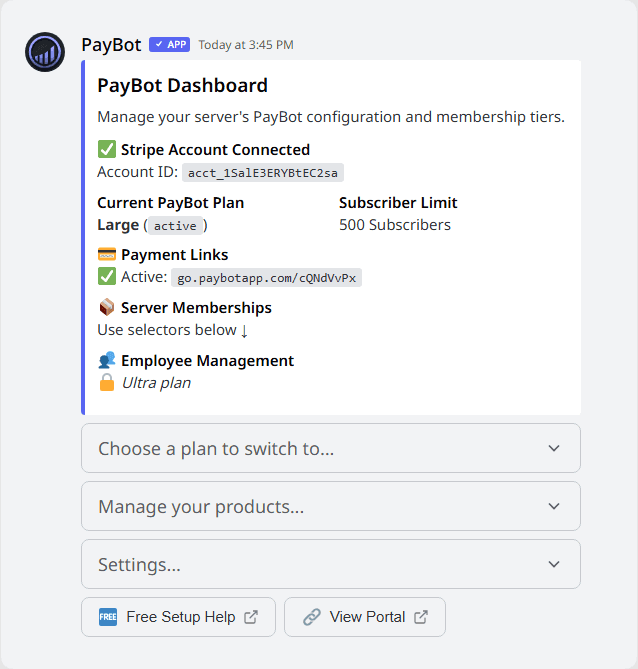
PayBot's Discord dashboard, captured from its public website on July 30, 2026.
PayBot currently advertises no monthly fee and a 3% charge on each sale. Stripe processing fees still apply separately.
That is a simple offer, especially for a new community with unpredictable revenue. The tradeoff is that PayBot's fee grows every time your sales grow, and its payment flow is built around Stripe.
Why look for a PayBot alternative?
PayBot may be a good choice if your entire audience pays by card and you want to start without a monthly software bill. Community owners usually start comparing alternatives for three reasons.
1. You want crypto payments
Some Discord communities serve buyers who prefer Bitcoin, Ethereum, stablecoins, or other cryptocurrencies. This is especially common in trading, gaming, Web3, sports, and international communities.
PayBot describes its product as a Stripe subscription platform. Subscord supports your own Stripe account and more than 100 cryptocurrencies, so a buyer can choose the payment method that works for them.
That flexibility can remove a checkout barrier without forcing you to abandon card payments.
2. A 3% platform fee becomes expensive at scale
Percentage pricing is easy to understand, but it compounds with success.
At $5,000 in monthly sales, PayBot's advertised 3% charge equals $150 per month before Stripe processing fees. At $10,000 in sales, it becomes $300 per month.
Subscord takes 0% of your sales. Its paid plans use flat monthly pricing, so the platform cost does not increase with revenue.
3. You want more control over payment options
Both products let card payments flow through your own Stripe account. Subscord adds a separate crypto checkout path that settles funds to your configured wallet.
This gives guilds a practical choice:
- Use Stripe for recurring card subscriptions
- Use crypto for global, wallet-based payments
- Offer both methods on the same store
Meet Subscord
Subscord is a Discord payment bot for selling subscriptions and one-time products with Stripe or cryptocurrency.
Guilds can create products, connect them to one or more Discord roles, publish a store page, and let Subscord handle access after checkout.
Subscord includes:
- Stripe card payments through your own Stripe account
- More than 100 supported cryptocurrencies
- Automated role assignment and removal
- Recurring subscriptions and one-time products
- Multiple roles and price options per product
- Custom store pages and checkout links
- Discounts, free trials, and a guild affiliate program
- Customer, subscription, transaction, and revenue dashboards
- Webhook and automation integrations
The key difference is the business model. Subscord charges 0% in platform fees. Standard Stripe processing applies to card payments, and the crypto payment provider charges 0.5% plus applicable network fees.
Subscord vs PayBot: quick comparison
| Feature | PayBot | Subscord |
|---|---|---|
| Platform pricing | 3% per sale | 0% platform fee |
| Monthly software fee | None advertised | Free, $39 Pro, or $65 Max |
| Card payments | Stripe | Your own Stripe account |
| Crypto payments | Not advertised | 100+ cryptocurrencies |
| Payout destination | Your Stripe account | Your Stripe account or configured crypto wallet |
| Subscriptions | Yes | Yes |
| One-time products | Yes | Yes |
| Automatic Discord roles | Yes | Yes |
| Storefront | Branded portal and payment pages | Guild store page and checkout links |
| Affiliate tools | Not a core advertised feature | Built-in guild affiliate program |
| Courses | Built-in course tools | Not a built-in course platform |
| Best fit | Stripe-only communities that prefer revenue share | Communities that want card plus crypto and flat pricing |
PayBot vs Subscord pricing
The platforms use two different pricing philosophies.
PayBot pricing
PayBot says it is free to install and charges 3% of every sale.
This can be attractive while revenue is low because there is no fixed monthly bill. It also means the software expense rises directly with sales.
| Monthly sales | PayBot fee at 3% |
|---|---|
| $500 | $15 |
| $1,000 | $30 |
| $5,000 | $150 |
| $10,000 | $300 |
These figures exclude Stripe's own processing charges.
Subscord pricing
Subscord charges 0% on sales and uses subscriber-based plans:
- Free: $0 per month for up to 10 active subscribers
- Pro: $39 per month for up to 50 active subscribers
- Max: $65 per month for up to 500 active subscribers
- Unlimited: $199 per month for unlimited active subscribers
With the Pro plan, the flat subscription costs less than a 3% platform fee once monthly sales exceed $1,300. With the Max plan, the break-even point is about $2,167 in monthly sales, and with the Unlimited plan it is about $6,633.
Your actual plan depends on active subscriber count, not revenue, so the best comparison uses both numbers. A small, high-priced community may save quickly with Subscord. A new community with low sales may find PayBot's revenue-share model cheaper at first.
Payment processing is separate on both platforms. Stripe charges its standard fees for card payments. Subscord's crypto provider charges 0.5% plus network fees for crypto transactions.
Where Subscord has the advantage
Card and crypto in one platform
The biggest difference is payment choice.
PayBot is built around Stripe. Subscord lets a guild use Stripe, crypto, or both. This matters when your buyers live in different countries, prefer stablecoins, or cannot use the same card rails.
No percentage-based platform fee
Subscord does not take a share of each sale. Once a guild moves beyond the free tier, it pays a predictable monthly plan instead.
That makes budgeting easier and prevents the software bill from scaling automatically with revenue.
Guild affiliate tools
Subscord includes an affiliate system for guilds that want members or promoters to refer new buyers. Guilds can manage affiliate applications, referral links, commissions, and crypto payouts from the dashboard.
A central management dashboard
Subscord gives guild teams a web dashboard for products, buyers, subscriptions, transactions, discounts, affiliates, team access, and performance reporting.
This is useful when more than one person runs the business or when you want a complete view outside Discord commands.
Where PayBot may be the better choice
A fair comparison should also cover what PayBot does well.
No fixed monthly fee
PayBot's 3% model can make sense for a new or seasonal community that wants costs to stay close to revenue.
Template-led selling pages
PayBot puts considerable focus on visual storefront and payment-page templates. Its Studio tools include mobile-first layouts, social links, product tiers, and verified reviews.
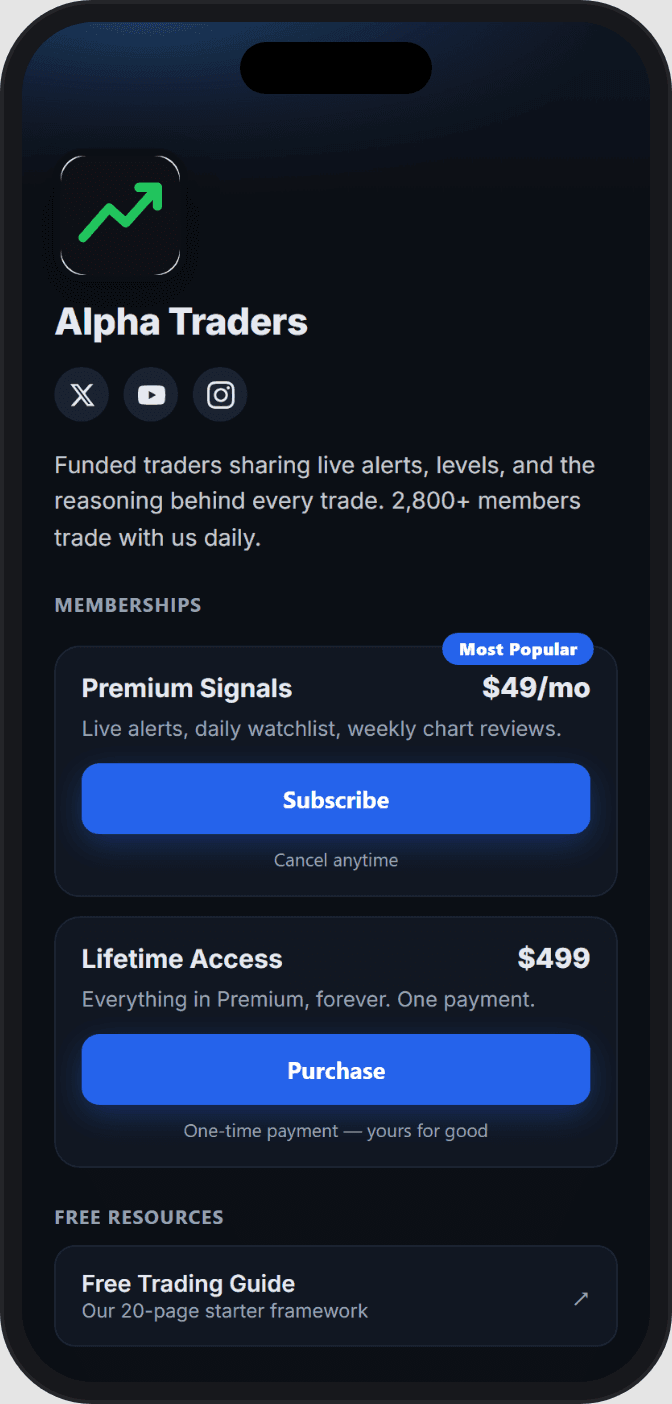
A PayBot mobile storefront example, captured from its public website on July 30, 2026.
Built-in course tools
PayBot advertises course modules, progress tracking, and role unlocks. If structured learning content is central to your offer, that is a meaningful feature that Subscord does not currently position as a native course platform.
More community operations inside Discord
PayBot emphasizes Discord-native setup, member billing support, private groups, event announcements, and voice-channel alerts.
Subscord focuses more directly on payments, storefronts, access automation, and guild business management. If you want one bot to handle additional community engagement workflows, compare those PayBot tools against your exact requirements.
Which PayBot alternative is right for you?
Choose Subscord if:
- You want to accept Stripe and cryptocurrency
- Your audience is global or crypto-native
- You prefer a flat monthly cost over a 3% revenue share
- You want built-in guild affiliate tools
- You need a detailed web dashboard for your team
- You sell both subscriptions and one-time products
Choose PayBot if:
- You only need Stripe payments
- You want no fixed monthly software fee
- Your current sales volume makes 3% cheaper than a Subscord paid plan
- Built-in courses or PayBot's Discord engagement tools are essential
For many established paid Discord communities, the decision comes down to payment flexibility and fee structure. If card plus crypto checkout and 0% platform fees matter more than built-in course tooling, Subscord is the stronger fit.
How to switch from PayBot to Subscord
Moving payment systems requires care because Discord access and recurring billing need to stay aligned.
- Create your Subscord account and add your guild.
- Configure Stripe, crypto wallets, or both.
- Recreate your products, prices, durations, and Discord role rules.
- Test checkout with a private product before sharing it.
- Publish your Subscord store and replace old payment links.
- Move existing buyers in controlled groups.
- Only cancel an old billing path after the replacement is confirmed.
Existing Stripe subscriptions created through PayBot do not automatically become Subscord-managed subscriptions. Keep a record of active buyers and renewal dates, and avoid running two charges for the same access period.
For a larger migration, join the Subscord Discord before changing live billing so the team can help you plan the safest sequence.
Final verdict
PayBot offers a capable Stripe-first system with no monthly fee, automatic Discord access, selling pages, courses, and community tools.
Subscord is the better PayBot alternative for guilds that want:
- Stripe and 100+ cryptocurrencies
- 0% Subscord platform fees
- Flat, predictable plans
- Automated Discord roles
- Subscriptions and one-time products
- Affiliate, discount, customer, and revenue management
Your payment platform should fit how your buyers want to pay and how your community expects to grow.
Start with Subscord and build a paid Discord store with card and crypto checkout.